mirror of
https://github.com/awesome-dsh-plugin/dsh-find-plugin.git
synced 2026-09-28 05:02:55 +08:00
 fkysly
fb4d66826a
fkysly
fb4d66826a
"Error: fetch failed" is what Node reports for every transport failure, with the
actionable part (DNS, refused connection, certificate, TLS) one level down in
`cause` — so a report against the plugin carried no way to tell a flaky network
from a blocked endpoint. The failure now carries the whole chain, and names the
one trap that otherwise reads as a plugin bug: a system proxy or VPN accelerator
is invisible to Node's fetch unless DSH itself was started with
NODE_USE_ENV_PROXY=1 (or --use-env-proxy). A browser has no such rule, which is
exactly why GitHub opens fine while this fails.

Verified on Node 25.6: with HTTPS_PROXY set and no opt-in the request goes
straight out (200 against a dead proxy at :9); with --use-env-proxy the same
request fails against it (ECONNREFUSED). Setting NODE_USE_ENV_PROXY at runtime
does not work — undici reads it once when its global dispatcher is created.

`DSH_HOME` resolution claimed to mirror @deepseek-ai/dsh-home-paths but skipped
its `~` expansion, so `DSH_HOME=~/x` resolved literally and wrote the cache to
a `./~` directory inside the working directory. Now expanded the same way the
host does it.

Tests: 3 new offline cases (28 pass, 2 live skipped); each was mutation-checked
— dropping the cause chain, the proxy hint, or the expansion each turns exactly
its own case red.
4.0 KiB
4.0 KiB
dsh-find-plugin 
English | 中文
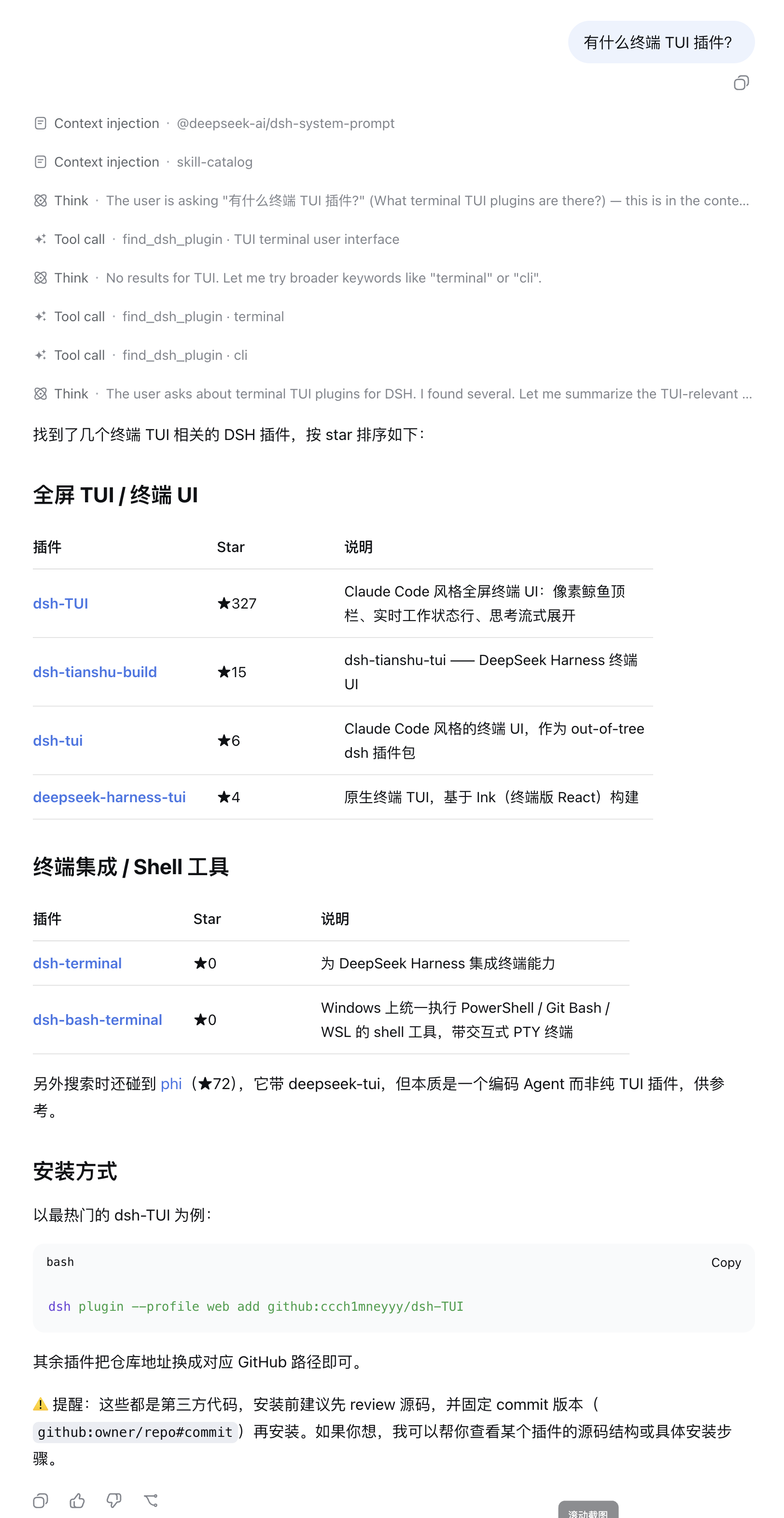
一个用来找插件的插件——就像 skills.sh 的 /find-skills,DSH 版。
想要什么能力,直接跟 agent 说(比如"任务完成时给我发微信通知"),它就去 GitHub 上的 DSH 插件生态里帮你搜——按 star 排序,每条带一句话说明和安装 命令。
安装
# npm 包(预构建,推荐)
dsh plugin --profile web add dsh-find-plugin

# 或从 GitHub 安装
dsh plugin --profile web add github:awesome-dsh-plugin/dsh-find-plugin
使用
安装后重启 dsh web,然后直接跟 agent 对话即可——需要找插件时它会自己调用
find_dsh_plugin:
- "有什么终端 TUI 插件?"
- "我想任务完成时收到微信通知,有插件吗?"
- "找个能在 DSH 里做 git diff 审查的东西。"
每条结果都带 star 数、功能描述、仓库链接和可直接执行的 dsh plugin add
安装命令——让 agent 帮你装,它可以直接替你执行。
工作方式
- 实时搜索打了官方
dsh-plugintopic 的 GitHub 仓库,按 star 数降序 (每查询 5 分钟缓存)。 - 命中 awesome-dsh-plugin 精选列表的仓库,
会换用列表中人工撰写的双语描述(
lang参数选择语言),排序不受影响。 - 每条结果附可直接执行的
dsh plugin add安装命令;插件均为第三方代码, 请自行审阅源码并锁定 commit。
限流与离线兜底
GitHub 搜索接口在未认证时只有 10 次/分钟/公网 IP 的额度,且该额度由同一出口 IP
背后的所有主机共享(运营商 CGNAT、公司 NAT…),因此搜索可能因你无法控制的原因返回
HTTP 403。插件因此做了三件事:
- 配置了 DSH 的
GITHUB_TOKEN凭据时会使用它(30 次/分钟、按账号计数,不受共享 IP 影响)。这是可选项——不配也能用,只是更接近匿名上限; - 遇到限流(403/429)或请求失败时先重试一次,仍失败则降级而非报错:改用 curated 列表的关键词匹配,并在结果末尾的 note 里说明;
- 把 curated 列表缓存到磁盘(
$DSH_HOME/cache/dsh-find-plugin/)并用If-None-Match/If-Modified-Since重新验证,因此重启和离线时用的是完整的 ~3400 条列表,而不是随包发布的小快照; - 会说明失败原因。Node 把所有传输层失败都统一报成
fetch failed,真正有用的信息 藏在cause里,所以插件会把整条因果链显示出来 (fetch failed ← certificate has expired (CERT_HAS_EXPIRED)),并指出那个最容易被 误认为插件 bug 的坑:系统代理 / VPN 加速器。Node 的fetch在 DSH 自身启动时没有NODE_USE_ENV_PROXY=1(或--use-env-proxy)的情况下不读代理环境变量,而浏览器 没有这条规则——这就是「浏览器能打开 GitHub、插件却报错」的原因。
兼容性
DSH 的插件 API 是预发布版本号,而 node-semver 规定:只有当 range 里存在与版本号
major.minor.patch 相同的 prerelease 比较器时,预发布版本才算满足该 range。因此
把 peer range 钉在某一条宿主线上,下一条线一发布就会悄悄失效。本插件声明的
@deepseek-ai/dsh-tools range 覆盖到 0.1.7 为止的每一条已发布宿主线,CI 里的
npm run check:peers 会从 registry 解析当前 latest / next 两条线,一旦覆盖不到
就直接失败。
开发
npm run typecheck                     # tsc --noEmit
npm test                              # 离线用例(mock fetch)
FINDP_LIVE=1 npm run test:live        # 可选:真实网络用例
许可
MIT © awesome-dsh-plugin