 Tim van der Lippe
2a1ede5c26
Tim van der Lippe
2a1ede5c26
`manage_node_deps.py` was changed in
https://chromium-review.googlesource.com/c/devtools/devtools-frontend/+/2259834
to add line endings at the end of the package.json file

However, `npm run install-deps` was not rerun to add the line endings.
To prevent future CLs that add deps to include the line ending changes,
fix them in this CL.

R=mathias@chromium.org

Change-Id: Id4ee0003520c4aa0cb55494cdf64df57e31a86d7
Reviewed-on: https://chromium-review.googlesource.com/c/devtools/devtools-frontend/+/2263952
Commit-Queue: Tim van der Lippe <tvanderlippe@chromium.org>
Commit-Queue: Mathias Bynens <mathias@chromium.org>
Auto-Submit: Tim van der Lippe <tvanderlippe@chromium.org>
Reviewed-by: Mathias Bynens <mathias@chromium.org>
colors.js


Please check out the roadmap for upcoming features and releases. Please open Issues to provide feedback, and check the develop branch for the latest bleeding-edge updates.
get color and style in your node.js console
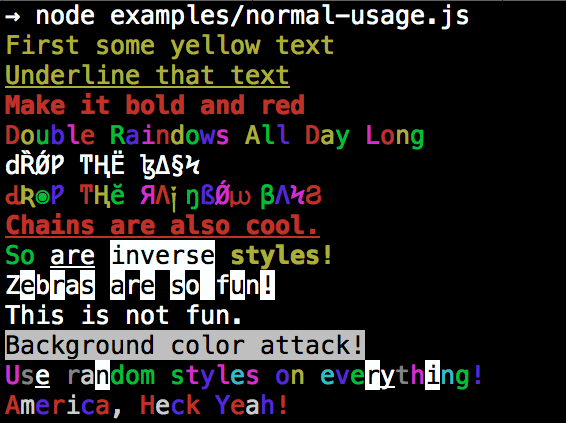
Installation
npm install colors
colors and styles!
text colors
- black
- red
- green
- yellow
- blue
- magenta
- cyan
- white
- gray
- grey
bright text colors
- brightRed
- brightGreen
- brightYellow
- brightBlue
- brightMagenta
- brightCyan
- brightWhite
background colors
- bgBlack
- bgRed
- bgGreen
- bgYellow
- bgBlue
- bgMagenta
- bgCyan
- bgWhite
- bgGray
- bgGrey
bright background colors
- bgBrightRed
- bgBrightGreen
- bgBrightYellow
- bgBrightBlue
- bgBrightMagenta
- bgBrightCyan
- bgBrightWhite
styles
- reset
- bold
- dim
- italic
- underline
- inverse
- hidden
- strikethrough
extras
- rainbow
- zebra
- america
- trap
- random
Usage
By popular demand, colors now ships with two types of usages!
The super nifty way
var colors = require('colors');

console.log('hello'.green); // outputs green text
console.log('i like cake and pies'.underline.red) // outputs red underlined text
console.log('inverse the color'.inverse); // inverses the color
console.log('OMG Rainbows!'.rainbow); // rainbow
console.log('Run the trap'.trap); // Drops the bass
or a slightly less nifty way which doesn't extend String.prototype
var colors = require('colors/safe');

console.log(colors.green('hello')); // outputs green text
console.log(colors.red.underline('i like cake and pies')) // outputs red underlined text
console.log(colors.inverse('inverse the color')); // inverses the color
console.log(colors.rainbow('OMG Rainbows!')); // rainbow
console.log(colors.trap('Run the trap')); // Drops the bass
I prefer the first way. Some people seem to be afraid of extending String.prototype and prefer the second way.
If you are writing good code you will never have an issue with the first approach. If you really don't want to touch String.prototype, the second usage will not touch String native object.
Enabling/Disabling Colors
The package will auto-detect whether your terminal can use colors and enable/disable accordingly. When colors are disabled, the color functions do nothing. You can override this with a command-line flag:
node myapp.js --no-color
node myapp.js --color=false

node myapp.js --color
node myapp.js --color=true
node myapp.js --color=always

FORCE_COLOR=1 node myapp.js
Or in code:
var colors = require('colors');
colors.enable();
colors.disable();
Console.log string substitution
var name = 'Marak';
console.log(colors.green('Hello %s'), name);
// outputs -> 'Hello Marak'
Custom themes
Using standard API
var colors = require('colors');

colors.setTheme({
  silly: 'rainbow',
  input: 'grey',
  verbose: 'cyan',
  prompt: 'grey',
  info: 'green',
  data: 'grey',
  help: 'cyan',
  warn: 'yellow',
  debug: 'blue',
  error: 'red'
});

// outputs red text
console.log("this is an error".error);

// outputs yellow text
console.log("this is a warning".warn);
Using string safe API
var colors = require('colors/safe');

// set single property
var error = colors.red;
error('this is red');

// set theme
colors.setTheme({
  silly: 'rainbow',
  input: 'grey',
  verbose: 'cyan',
  prompt: 'grey',
  info: 'green',
  data: 'grey',
  help: 'cyan',
  warn: 'yellow',
  debug: 'blue',
  error: 'red'
});

// outputs red text
console.log(colors.error("this is an error"));

// outputs yellow text
console.log(colors.warn("this is a warning"));
Combining Colors
var colors = require('colors');

colors.setTheme({
  custom: ['red', 'underline']
});

console.log('test'.custom);
Protip: There is a secret undocumented style in colors. If you find the style you can summon him.